Every job, start to finish.
Create, assign, and run every work order with tasks, parts, and proof of work. And for the first time, measure whether you delivered: resolution times, pauses, and the real cost of every stop.
Closing the order isn't the same as meeting it.
Almost every operation knows what got done. Very few know whether it landed on time, how long it sat waiting on a part, and how much money the stop behind it cost.
The work lives in WhatsApp
Loose photos, voice notes, and a “is it done yet?”. With no tasks, no parts, and no evidence, there's nothing left to review afterward.
Nobody knows if you met it
With no SLA measured, “we responded fast” is an opinion. You can't tell which priority, which asset, or which owner is missing.
The stop has no price tag
The asset sat down for seven days. What did that cost? If you don't measure it per asset and location, you can't justify the spare.
The order
The whole job, in one order.
Status, priority, tasks, parts, and time, with the SLA clock running. And paused when the wait isn't yours to control.
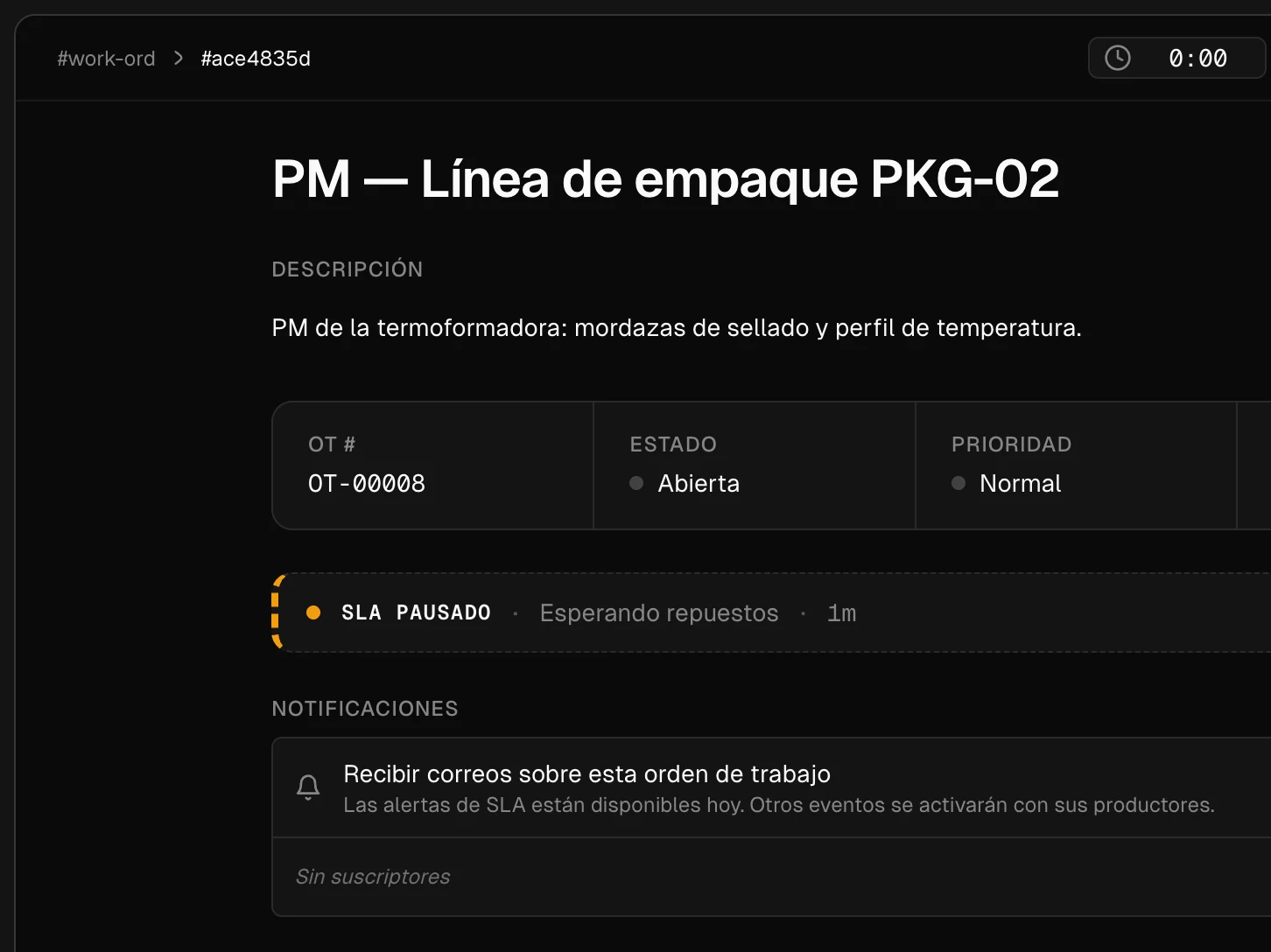
Waiting on parts, waiting on the customer, or held for approval. Time you don't control doesn't count against you.
Timer sessions per person, not a number typed in at close-out.
Photos, signature, and notes stay attached to the order as evidence.
And it isn't assembled by hand every time.
Tasks come from templates per equipment type, and you define the statuses an order moves through. A hundred orders a month start equally complete without anyone typing them twice.
Checklist templates
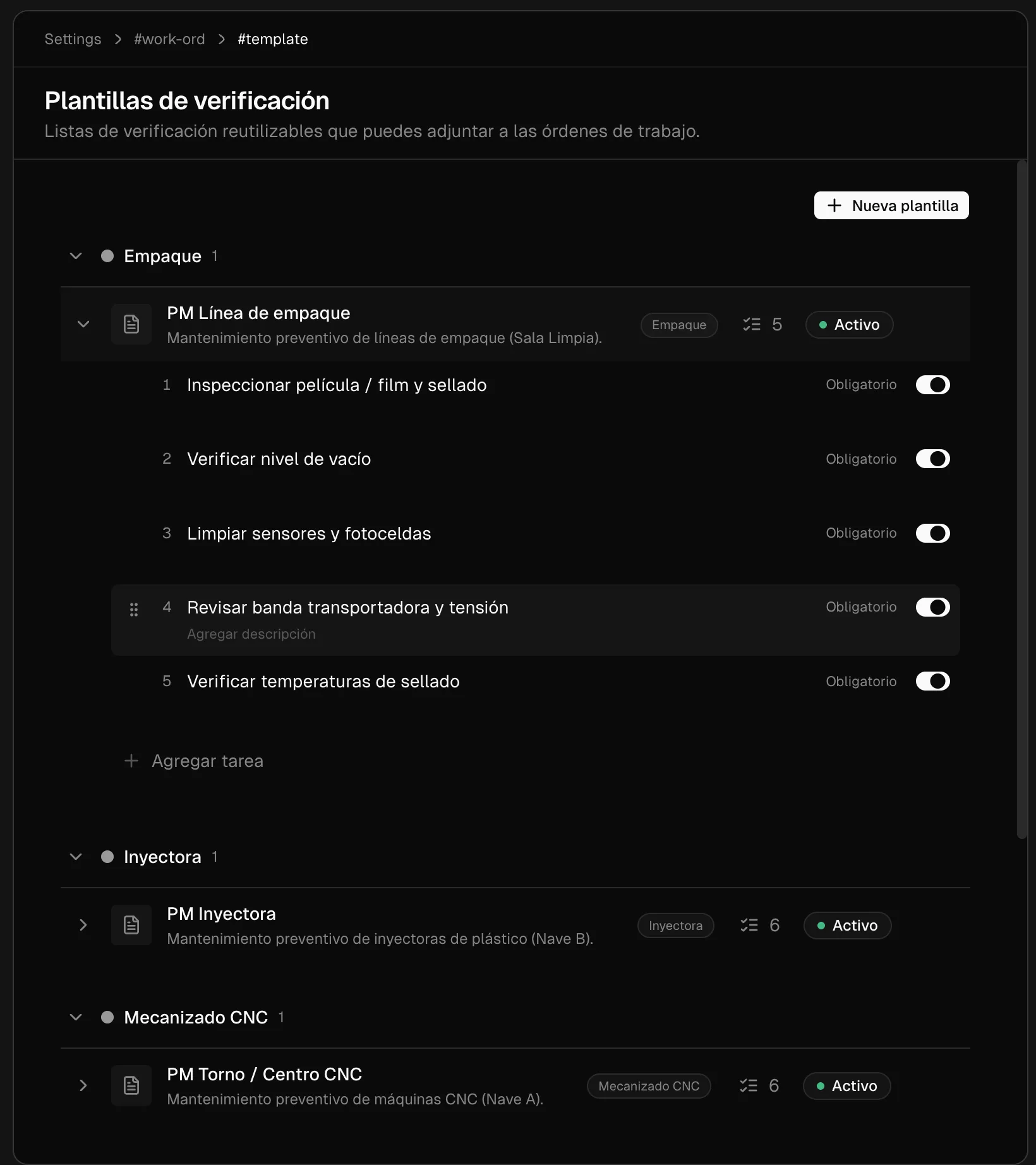
Reusable checklists grouped by equipment type. Every task carries its order and its required flag, and the whole list attaches to the order at creation.
Statuses and workflow
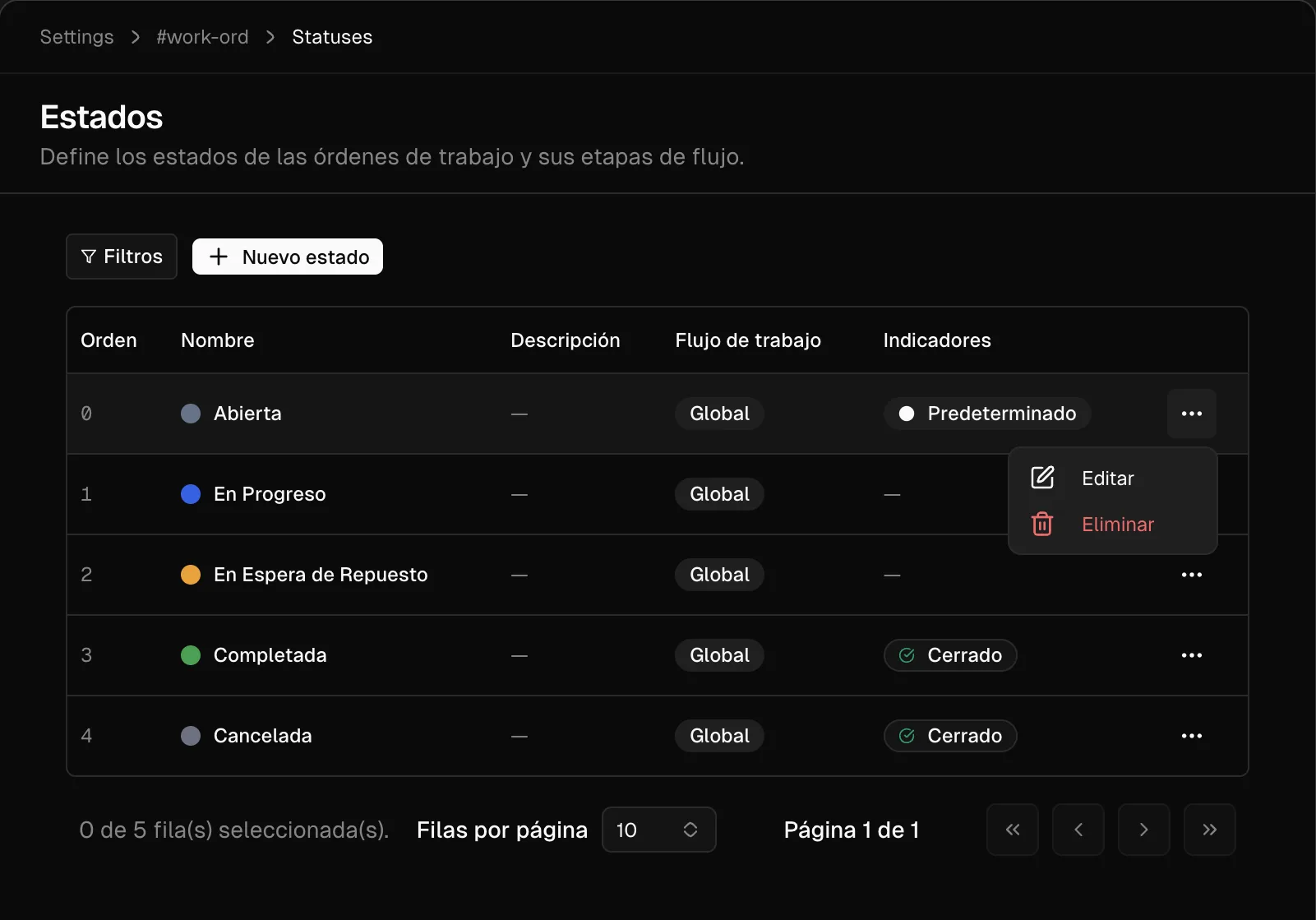
Define your own statuses: Open, In Progress, Waiting on Parts, Completed, Cancelled. You set their order and which of them closes the order, and the SLA clock and the reports read that configuration.
SLA compliance
Who's missing, on what, and why.
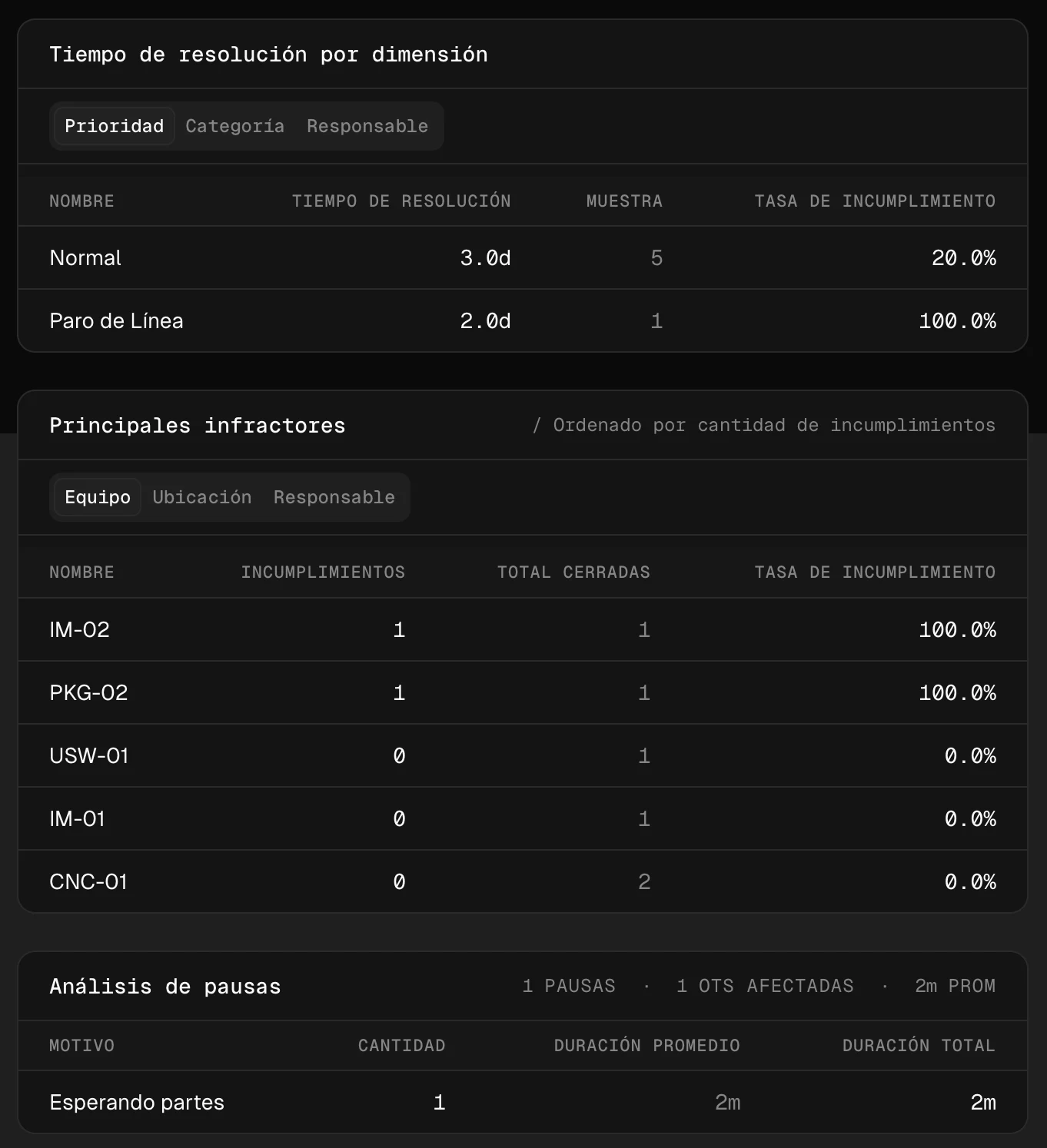
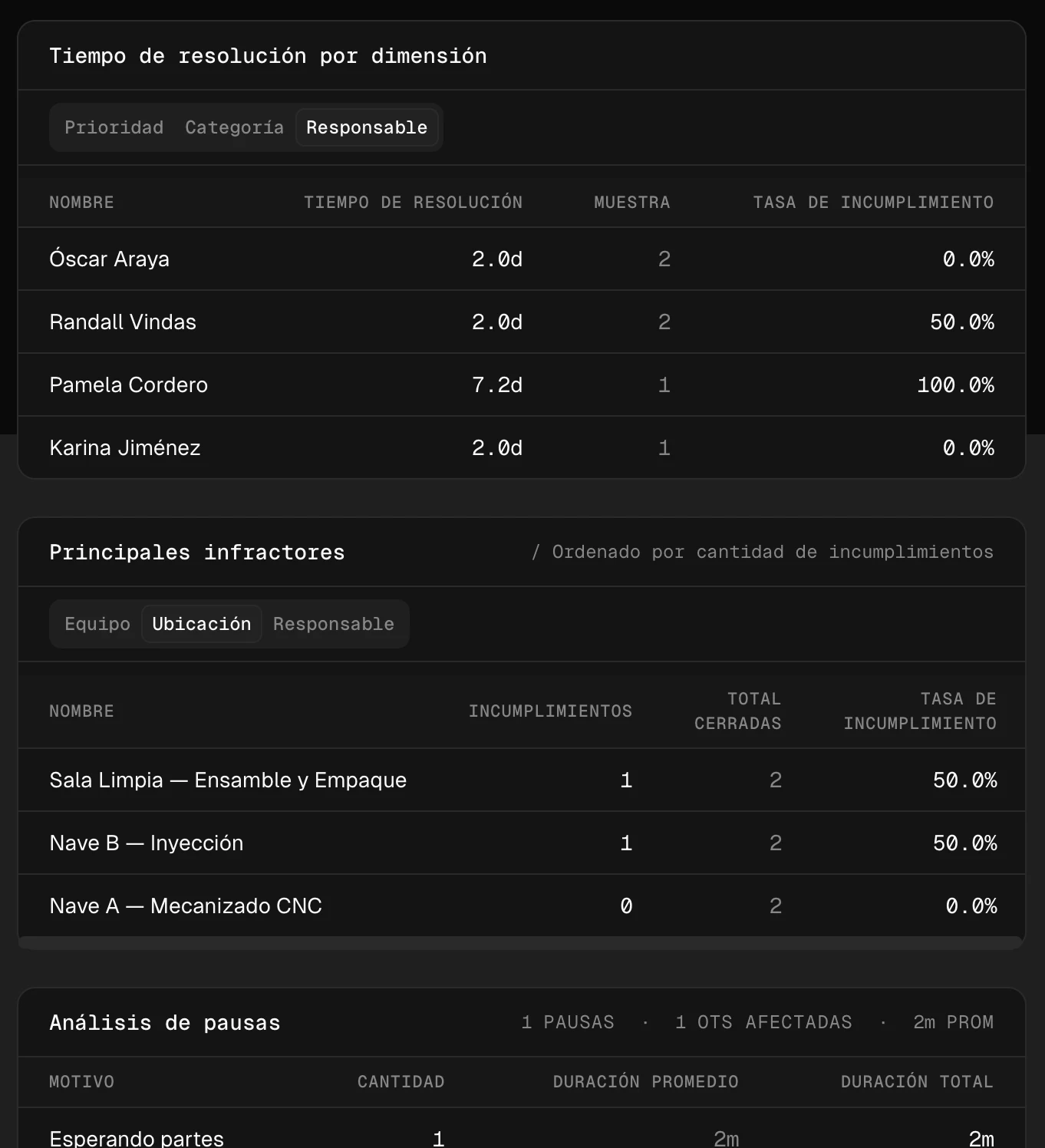
Resolution time by priority, category, or owner. Plus the number almost nobody tracks: how long the clock sat paused, and what it was waiting on.
By priority and by asset
Resolution time and breach rate by priority, with the top offenders by asset. Below it, the pause analysis: how many, for which reason, and how much time they added up to.
By owner and by location
The same report pivoted. Same sample, different question: who accumulates the breaches and which bay concentrates them.
Reliability
What every stop actually costs.
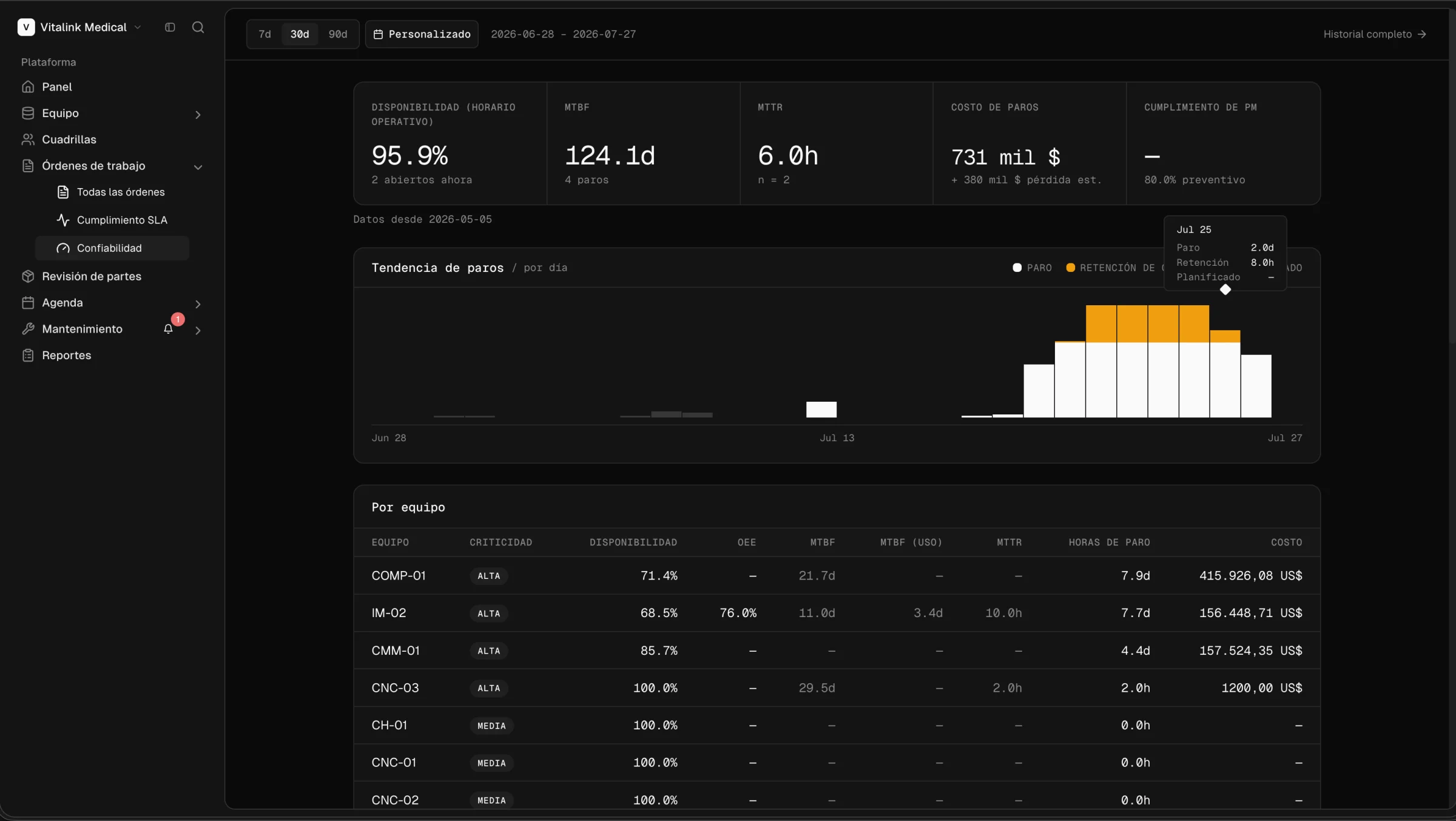
Availability — Share of your operating hours the asset was ready to run. Computed against your real shifts, not a 24/7 baseline., MTBF — Mean Time Between Failures. Average run time between one failure and the next. Higher is better., MTTR — Mean Time To Repair. Average time from the moment an asset stops until it's running again. Lower is better., and downtime cost per asset and per location, computed against your operating calendar, not a theoretical 24/7 nobody works.
Indicators and downtime trend
Availability, MTBF, MTTR, period cost, and PM compliance up top. Below it, the daily curve splitting stop, hold, and planned time, and the per-asset table with criticality, OEE — Overall Equipment Effectiveness. Availability × performance × quality, computed only over declared production periods. If any of the three is missing, it shows empty instead of invented., and downtime hours.
By location, failure Pareto and open stops
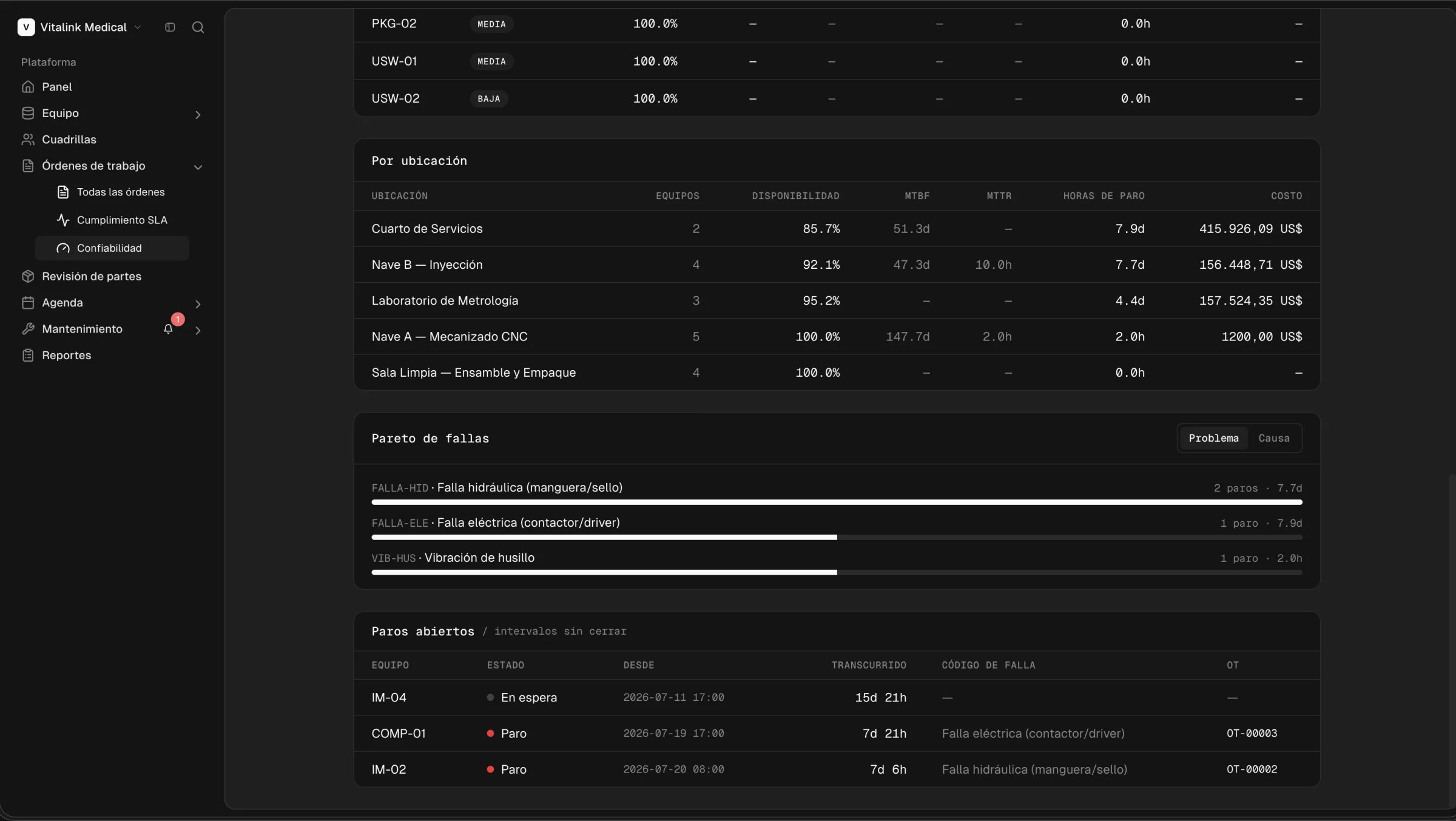
Which bay concentrates the downtime, which failure mode explains it — hydraulic, electrical, vibration — and which intervals are still open right now, with elapsed time and their linked order.
Categories
The category isn't a label.
Every category carries its SLA policy and the skills it demands. Classifying the order already decides which clock it's measured against and who is allowed to take it, with nobody remembering it by hand.
Work-order categories
Six real categories from a plant floor: calibration, diagnosis, installation, preventive, improvement, and corrective. Each with its SLA level (critical, high, or normal) and the minimum skill it demands.
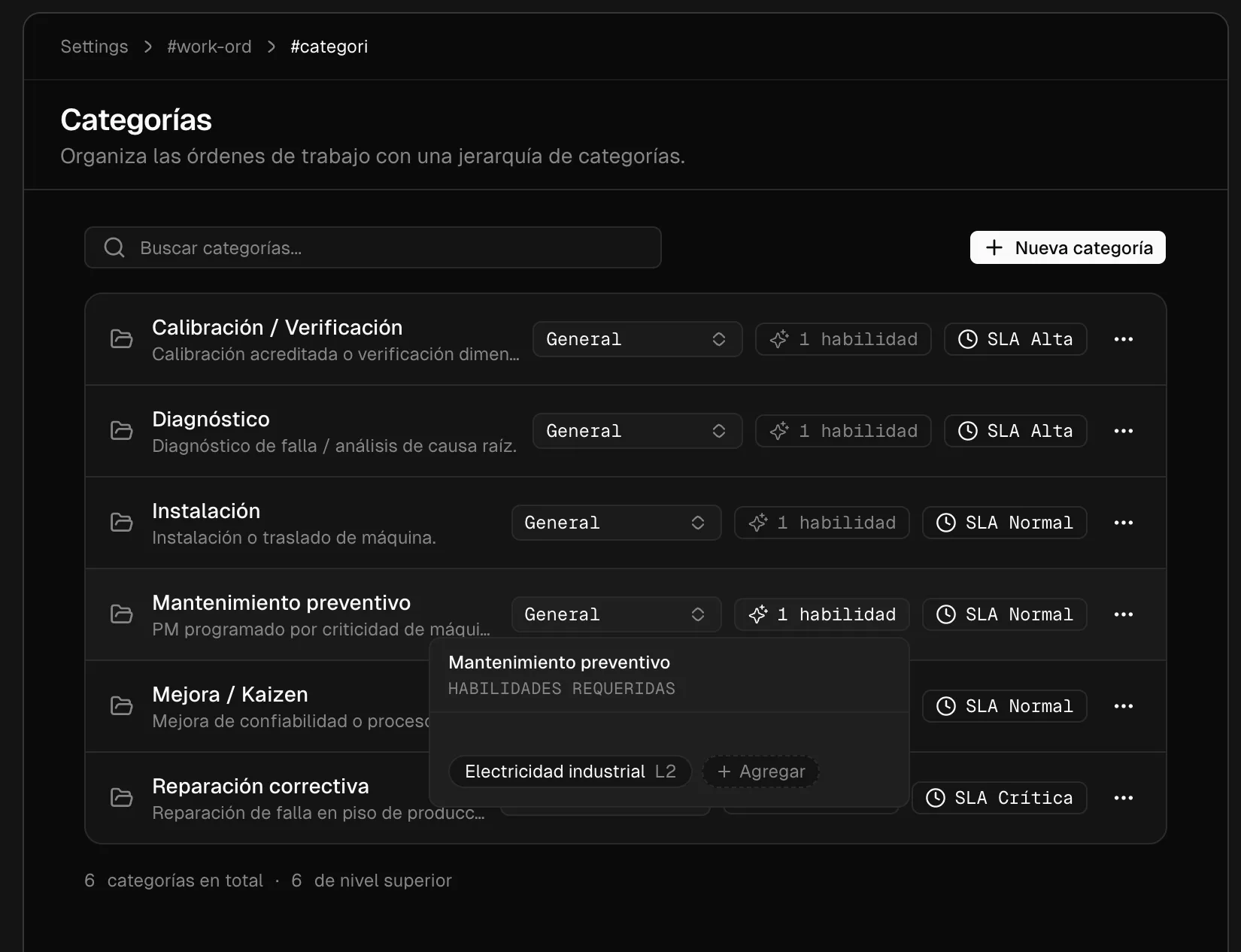
One policy per category, with its own response and resolution minutes. A corrective on the floor isn't measured against the same clock as an installation.
The category demands the skill and its minimum level. Dispatch only proposes people who hold it, instead of finding out once the tech is already on site.
Categories nest under a parent, so you can report by family of work without renaming every old order.
How it works
From request to auditable close.
The same path for an urgent corrective and a scheduled preventive, with the clock running from minute one.
It opens
Manually, from a maintenance plan, or triggered by an equipment stop.
It's assigned
Dispatch proposes a tech or crew by skill, availability, and distance.
It's executed
Tasks, parts, timer, and evidence from the field app.
It's measured
SLA compliance, resolution time, and the cost of the stop behind it.
Work orders don't live alone.
Every order touches the rest of the platform, with no double entry.
Everything the work-order module does.
From the request to the reliability report, without leaving the platform.
- Create & assign
- Generate orders and dispatch them to the right crew in seconds, manually or automatically from a plan.
- Reusable templates
- Predefined checklists and parts per job type, so every recurring order starts consistent.
- Configurable statuses
- Define your own statuses, priorities, and categories; the flow adapts to how your team operates.
- SLA clock
- Response and resolution targets by priority or category, with live state: on track, at risk, or breached.
- Justified pauses
- Pause the clock for parts, customer, or approval holds, and measure each reason separately.
- Part reservations
- Reserve spares against the order and catch shortages before sending a tech to site.
- Per-tech timer
- Time sessions per person, for real labor cost instead of an estimate.
- Proof of work
- Photos, signature, and notes attached that close every order with auditable evidence.
- Subscribers & alerts
- Anyone who needs to know gets every status change and SLA alert by email.
- Compliance analytics
- Resolution time and breaches by priority, category, owner, asset, and location.
- Reliability
- Availability, MTBF, MTTR, failure Pareto, and downtime cost per asset and location.
- Operating calendar
- Availability is computed against your real shifts, not a 24/7 nobody works.
Frequently asked questions
- What is a work order in Grivara OPS?
- A work order captures a job from start to finish, tasks, parts and proof of work in one place, that you create, assign to the right crew and track to completion.
- Can I standardize recurring jobs?
- Yes. Reusable templates let you standardize recurring work with predefined checklists and parts, so each job starts consistent.
- How do I track the status of a work order?
- Every order shows its real-time status, open, in progress or completed, with task-level progress.
- How does Grivara OPS prove a job was done?
- Each job closes with proof of work: photos, signatures and notes attached to the order as evidence.
- Can I assign work orders to a specific crew?
- Yes. You generate orders and dispatch them to the right crew in seconds.
- Does Grivara OPS measure SLA compliance?
- Yes. You define response and resolution targets by priority or category, and every order shows its live state: on track, at risk or breached. The compliance report breaks resolution time and breach rate down by priority, category, owner, asset and location.
- What happens if an order is waiting on a spare part?
- The SLA clock pauses with a reason: waiting on parts, waiting on the customer or held for approval. Time you don't control doesn't count against you, and the pause analysis shows how often and how long each reason stopped the clock.
- Can I see what an equipment stop costs?
- Yes. The reliability report computes availability, MTBF, MTTR and downtime cost per asset and per location, with a failure Pareto that ranks problems by impact and a list of open stops that are still running.
- Which schedule is availability calculated against?
- Your operating calendar, meaning the shifts your plant actually works. If you don't define one, it falls back to straight calendar time, and the report states which of the two bases was used.
See work-order management in action.
We'll walk one real order end to end, and the compliance report that comes out of it.
Request a demo